
Skip to Main Content
    • Your Cart - $15.92
    WONDERFULL INC
    • Home
      • About Us
      • Why Choose Us
      • Events
        • Canada AgTech Demo
        • T100 DEMO REGISTRATION FORM
        • Event Photos
      • Careers
      • Contact Us
    • Shop
      • DJI Agriculture Drones and Parts
        • DJI T100 and Parts
        • DJI T25P and Parts
        • DJI T50 and Parts
        • DJI Legacy Parts
          • DJI T40 Parts
          • DJI T30 Parts
          • DJI T25 Parts
          • DJI T20P Parts
          • DJI T20 Parts
          • DJI T10 Parts
      • DJI Enterprise Drones & Parts
      • SPECIALS
        • Self-Loading Lift Cart
        • Self-Loading Stacker
        • Robotic Dog
          • Electric Equipment
            • Electric Forklift
            • Electric Ride-On Solutions
        • Pallets & Containers
          • Plastic Pallets (Industrial)
          • Heavy-Duty Collapsible Pallet Boxes
          • Bulk Containers (1 m³ Industrial Bins)
      • Clearance
      • Training Courses
    • Solutions
      • Find a Drone Applicator
      • Become an Applicator
      • Start Your Ag Drone Business
      • Start with AGRO
        • Which Crop Feels Most Like You?
          • Canada’s Favorite Vegetable Personalities
          • Canada’s Major Field Crop Personalities
          • Canada’s Orchard & Tree Personalities
          • Canada’s Berry Personalities
      • Cross-Border Agricultural Drone Repair
      • Repair & Technical Support
    • Compliance
      • Getting Started in Canada
      • Agricultural Drone Regulations
      • Licensing Guide
      • Compliance FAQ
    • Training
      • Transport Canada Certification Courses
      • Agriculture Drone Training
      • Learning Center
      • Agriculture Drone Practical Guide
      • Drone Knowledge Self-Assessment
      • Crash Recovery Program
      • Videos
      • FAQ
    • Partner
    • Home
      • About Us
      • Why Choose Us
      • Events
        • Canada AgTech Demo
        • T100 DEMO REGISTRATION FORM
        • Event Photos
      • Careers
      • Contact Us
    • Shop
      • DJI Agriculture Drones and Parts
        • DJI T100 and Parts
        • DJI T25P and Parts
        • DJI T50 and Parts
        • DJI Legacy Parts
          • DJI T40 Parts
          • DJI T30 Parts
          • DJI T25 Parts
          • DJI T20P Parts
          • DJI T20 Parts
          • DJI T10 Parts
      • DJI Enterprise Drones & Parts
      • SPECIALS
        • Self-Loading Lift Cart
        • Self-Loading Stacker
        • Robotic Dog
          • Electric Equipment
            • Electric Forklift
            • Electric Ride-On Solutions
        • Pallets & Containers
          • Plastic Pallets (Industrial)
          • Heavy-Duty Collapsible Pallet Boxes
          • Bulk Containers (1 m³ Industrial Bins)
      • Clearance
      • Training Courses
    • Solutions
      • Find a Drone Applicator
      • Become an Applicator
      • Start Your Ag Drone Business
      • Start with AGRO
        • Which Crop Feels Most Like You?
          • Canada’s Favorite Vegetable Personalities
          • Canada’s Major Field Crop Personalities
          • Canada’s Orchard & Tree Personalities
          • Canada’s Berry Personalities
      • Cross-Border Agricultural Drone Repair
      • Repair & Technical Support
    • Compliance
      • Getting Started in Canada
      • Agricultural Drone Regulations
      • Licensing Guide
      • Compliance FAQ
    • Training
      • Transport Canada Certification Courses
      • Agriculture Drone Training
      • Learning Center
      • Agriculture Drone Practical Guide
      • Drone Knowledge Self-Assessment
      • Crash Recovery Program
      • Videos
      • FAQ
    • Partner
    29 Aug 2022

    Log file

    by Jenny | posted in: Log In | 0
    Post Views: 58

    godlessly How to upload your log file from your remote controller

    Aug. 2022

    The first thing to do is to connect the drone to the remote control because we need the data on the drone. From your remote control page, follow the steps below.
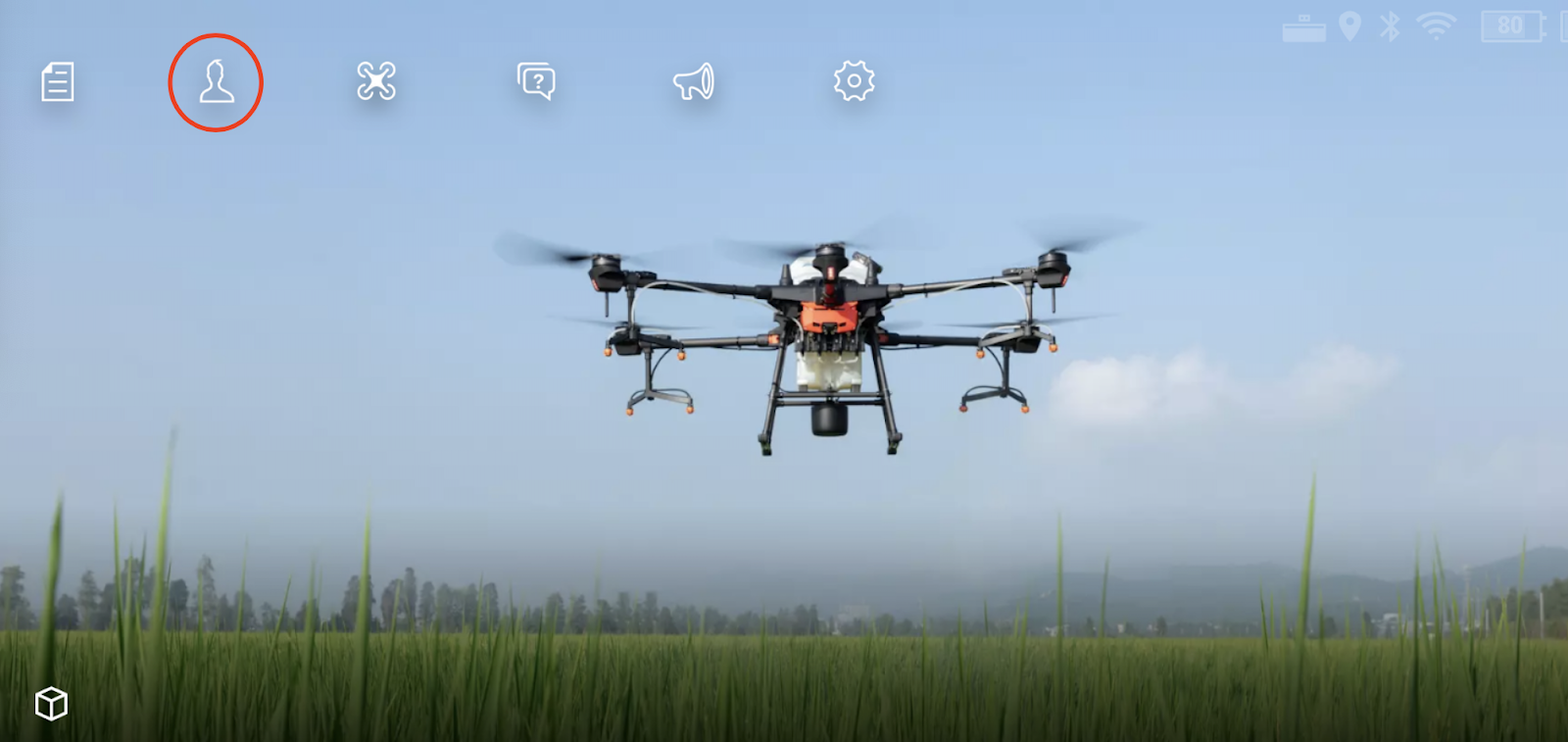
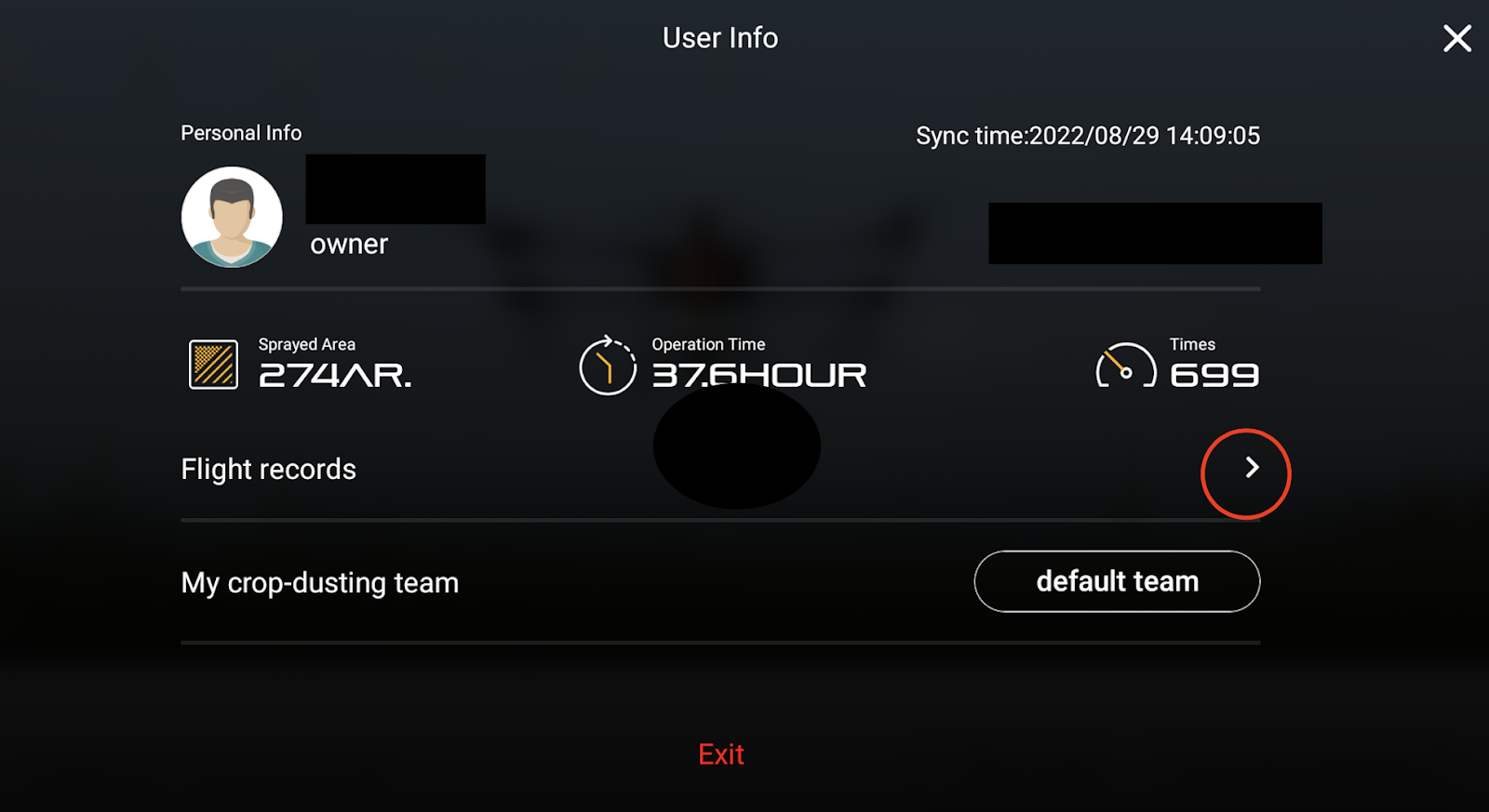
    If there is a warning on the drone remote controller screen, and you want to upload the log to reflect the problem, you can select this question mark to report in time. 

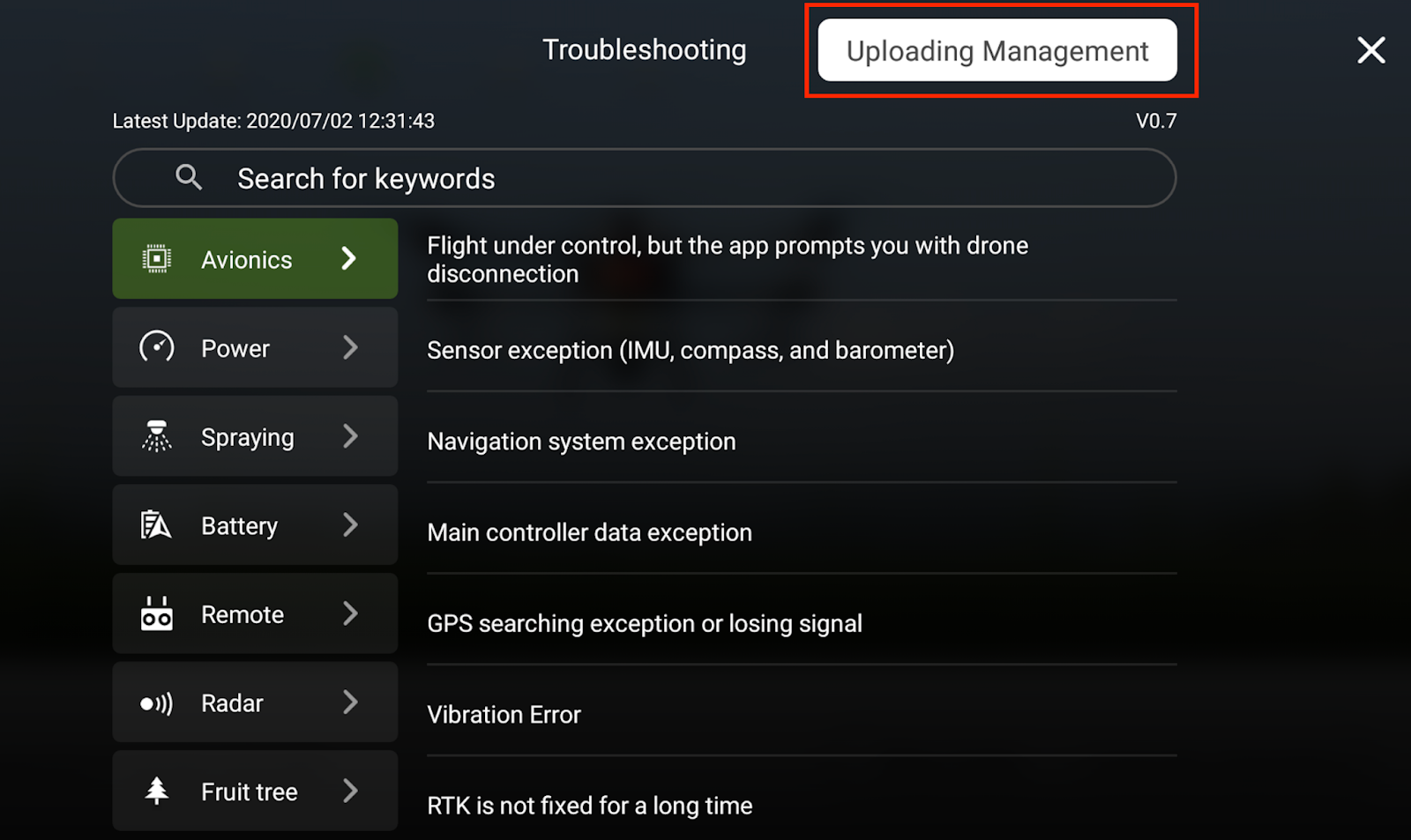
    Make sure the remote is connected to the Internet, then click the question mark (?) on the page. Select Avionics system, — Other— Upload the log.

    The remote controller will search and show all the records of the drone.

    You can select the record of the day of the crash to upload. After the upload is complete, the system will generate a QR code. Please email the QR code to us, and we will conduct a system analysis with DJI engineers.

    If there is no data in Avionics, please select App, —Other, upload, you need to select the date of the crash day, after uploading is completed, the system will generate a QR code, please send the QR code to us, we will Conduct system analysis with DJI engineers.
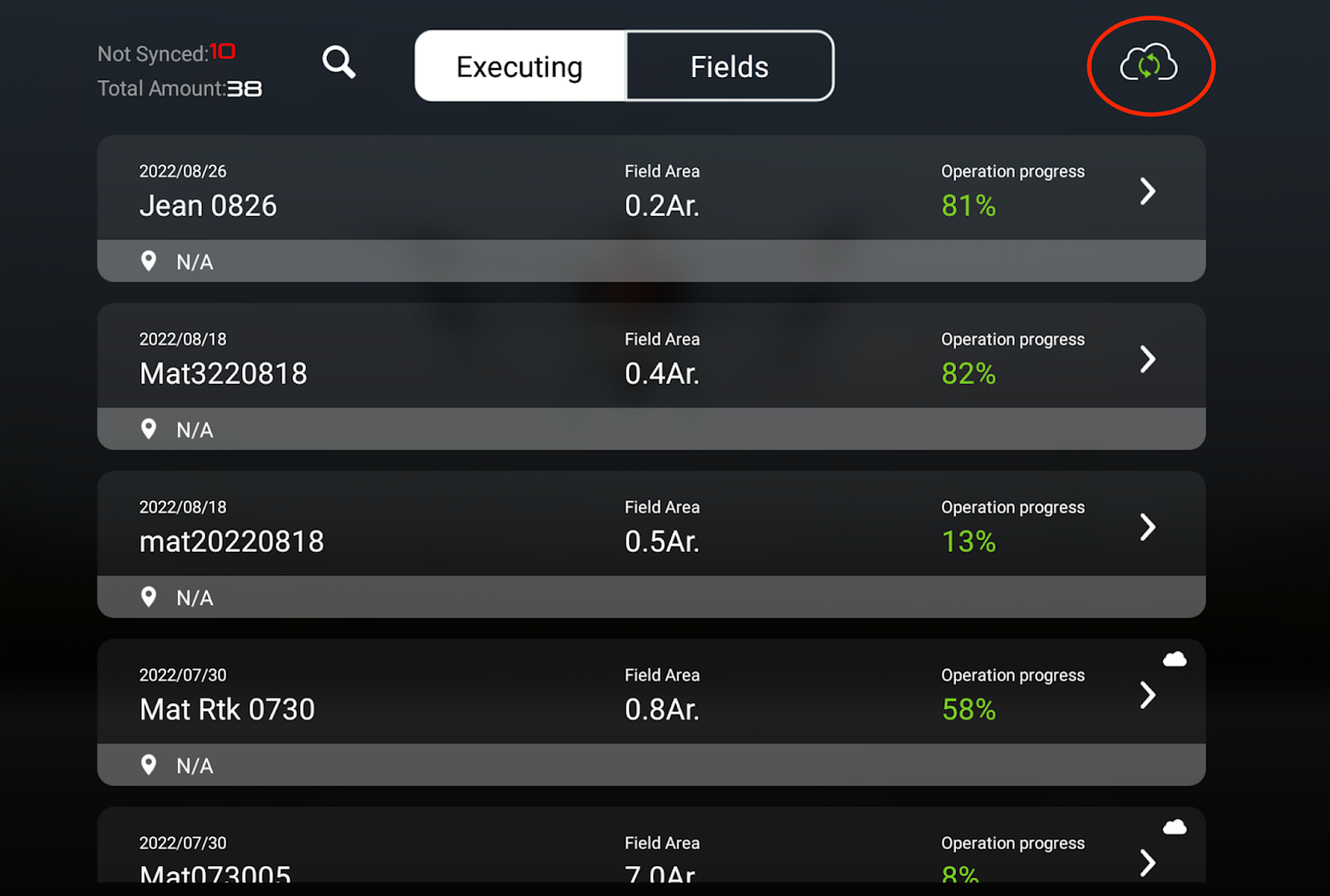
    In case the data will be lost after the remote controller stop working and restarts, you can upload the job information to your account in time.

    Tips

    1. Do not force the drone to work after the warning.
    2. You can upload three records maximum per time.
    3. Please upload the data of the crash date following the APP – Other

    This is Wonderfull Inc.’s internal training material, please do not forward it to anyone without authorization, please keep it confidential.

    © 2026 WONDERFULL INC - WordPress Theme by Kadence WP